
Best WiFi Connection in Dighi: Internet Express 2026
July 17, 2026
JioFiber vs Airtel Xstream vs Local Fibre ISP in Pune 2026
August 5, 2026
You’ve just moved into a flat in Moshi. The Jio guy says fibre isn’t in your building yet. Airtel’s website asks for your PIN code and then goes quiet.
Someone in the society WhatsApp group recommends a local provider, but you have no idea what they charge, what documents you need, or whether you’ll be online this week or next month.
That uncertainty is the real problem with getting a new broadband connection Pune residents face, and it costs people days of tethering to their phones.
Here’s the short answer before we get into detail: if fibre already runs to your building, you need one government-issued ID that also proves your address, you should expect to pay between ₹500 and ₹1,500 a month depending on speed, and a competent local provider can have you online the same day.
The demand is real, and it’s growing faster than most people assume.
According to TRAI’s telecom subscription data for June 2026, India now has 47.71 million wireline broadband subscribers and wireline connections grew over 30% year-on-year in the quarter ending March 2026.
Fixed-line fibre isn’t the dying category people thought it was a decade ago.
It’s the fastest-growing part of Indian telecom right now, largely because mobile data can’t handle a household where two adults are on video calls while a child streams a class.
I’ve watched this play out across PCMC for years, and the pattern is always the same: people spend a week comparing plans, then lose another week discovering their chosen provider doesn’t actually serve their lane.
So let’s fix the order of operations. Coverage first, paperwork second, price third.
First Check Whether Fibre Actually Reaches Your Address
This is the step almost everyone skips, and it’s the one that wastes the most time.
Broadband coverage in Pune is not a city-level thing or even a locality-level thing. It’s a building-level thing.
A provider can serve one wing of a society and not the other, simply because the fiber has been pulled to one riser and not the second.
Why coverage varies street by street in Pune
Fibre to the home works by running optical fiber from a provider’s local node into your building, then into your flat we’ve explained how fiber internet works in more detail here.
Laying that last stretch requires permissions, duct access, and often a society NOC.
National providers prioritise large, newly built projects because the economics are better.
That’s why a 300-flat tower in Moshi gets fibre-ready status on day one, while a 12-flat building 400 metres away waits two years.
Local providers work the opposite way. Because their entire network sits within PCMC, they run fibre into smaller buildings, older colonies and gaothan areas that the national ISPs deprioritise.
In practice, that means a street in Dighi or Indrayani Nagar with poor JioFiber availability may have two or three working local options.
How to check availability in under five minutes
Don’t rely on a national provider’s PIN code checker. A 411026 result tells you fibre exists somewhere in Bhosari, not that it reaches your door.
Instead, do these three things:
- Send your full address on WhatsApp to a local provider building name, wing, floor and nearest landmark. A provider with local field teams can confirm feasibility from their network map in minutes. You can also check which PCMC areas we cover before you enquire.
- Ask your watchman or society secretary which providers already have equipment in the building. Existing cabling is the single strongest predictor of a fast install.
- Ask neighbours directly, especially about evening performance. A connection that tests fine at 11 a.m. and collapses at 9 p.m. is a congestion problem, not a speed problem.
Once coverage is confirmed, the paperwork is genuinely simple.
Most delays with a new broadband connection in Pune customers report come from missing address proof, not from the provider’s network.

Documents Required for a Broadband Connection in Pune
Every internet provider in India, from BSNL to the smallest local ISP, follows the same customer verification rules laid down by the Department of Telecommunications.
Nobody can shortcut this, and any provider offering to skip it is a provider you should walk away from.
Valid proof of identity and proof of address
You need documents that establish Proof of Identity (POI) and Proof of Address (POA). One document can satisfy both.
Document | Covers POI | Covers POA | Notes |
Aadhaar card | ✅ | ✅ | Easiest option single document, instant verification |
Passport | ✅ | ✅ | Accepted as both |
Driving licence | ✅ | ✅ | Address must be current |
Voter ID | ✅ | ✅ | Accepted as both |
PAN card | ✅ | ❌ | Needs a separate address proof |
Electricity or gas bill | ❌ | ✅ | Usually must be under 3 months old |
Rent agreement | ❌ | ✅ | Registered agreement preferred |
Bring originals, not photocopies. The technician verifies them on the spot during the installation visit and returns them immediately.
You’ll also sign a Customer Acquisition Form and hand over one passport photograph.
What changes if you rent, study, or run a small business
If you rent, your Aadhaar probably still shows your hometown address. That’s fine, pair your Aadhaar as identity proof with a registered rent agreement as address proof.
Some providers also accept a recent electricity bill in the landlord’s name plus a signed consent letter, though this varies, so ask before the technician arrives.
If you’re a student in a PG or hostel, you’ll generally need the accommodation owner’s consent since the connection terminates at their property.
Many students avoid this entirely by having the owner take the connection and splitting the cost.
If you’re a small business, a shop, clinic, or office you’ll usually need proof of business address such as a Shop Act licence or GST certificate, and the connection must be booked under a commercial plan.
For small offices and shops, a new broadband connection in Pune businesses rely on should be registered under a commercial plan from day one.
Residential broadband plans in Pune are contractually restricted to home use, so registering an office connection as residential can get it terminated later.

New Broadband Connection Pune Costs: What You Actually Pay in 2026
Pricing in Pune is genuinely competitive, which is good news, but advertised prices and final bills often differ. Here’s how the numbers break down.
The cost of a new broadband connection in Pune households pay in 2026 depends far more on your billing cycle than on your chosen speed.
Installation charges and router costs
There are three cost buckets, and only the first is negotiable:
- Installation charge historically ₹500 to ₹1,500. Most providers in PCMC now waive this entirely on quarterly or longer plans. Ask directly; it’s rarely offered unprompted.
- WiFi router a dual band router costs ₹1,500 to ₹3,000 if you buy one. Many providers now include it free for the duration of your subscription. Confirm whether it’s free or refundable deposit, because those are very different things.
- Security deposit some providers still take ₹500 to ₹1,000, refundable on disconnection. Several local ISPs have dropped it.
Honest advice: a “₹0 installation” offer attached to a plan that costs ₹200 more per month is not a discount. Compare the twelve-month total, not the joining offer.
Monthly plan costs by speed
Most home broadband plans in Pune sit between ₹500 and ₹1,500 per month, all inclusive:
Speed | Typical monthly range | Best suited for |
50 Mbps | ₹450 – ₹600 | 1–2 people, browsing, HD streaming |
100 Mbps | ₹550 – ₹750 | Small family, work from home, online classes |
200 Mbps | ₹650 – ₹950 | 3–5 devices, 4K OTT, gaming |
300 Mbps | ₹800 – ₹1,200 | Large family, multiple WFH users, heavy uploads |
400 Mbps+ | ₹1,000 – ₹1,500 | Power users, content creators, small offices |
You can compare current Internet Express broadband plans in PCMC against this table. Every plan includes unlimited data, free installation and a free dual band router.
Longer commitments cut the monthly rate significantly. A 12-month plan is typically 25–35% cheaper per month than a rolling 30-day plan, which is worth taking once you’ve confirmed the service actually performs in your building.
Before you compare plans, it helps to know that a new broadband connection in Pune providers install is only as fast as the fibre already running into your building.
How Long Broadband Installation in Pune Really Takes
Installation timelines are where local providers and national ones genuinely diverge, and it’s rarely about technology.
It’s about how far the technician has to travel and how many jobs are queued ahead of yours.
A realistic timeline for a new broadband connection Pune households can plan around
If fibre already reaches your building, installation is a 60 to 90 minute job. The variable is scheduling, not engineering.
Scenario | Realistic timeline |
Fibre already in your building, local provider | 2–4 hours to same day |
Fibre in your building, national provider | 24–72 hours |
Fibre on your street but not in the building | 3–7 days (riser cabling needed) |
No fibre in the area | 2 weeks to several months, or not feasible |
Local ISPs move faster on the first two because their field teams are physically stationed in the areas they serve.
A technician covering Bhosari, Dighi and Moshi can reach any address within twenty minutes.
A national provider routing jobs from a central Pune hub cannot match that, no matter how good their network is.
If you’re shifting house, book the connection before you move, not after. Confirm feasibility a week ahead and schedule installation for the day you get keys.
If you’re shifting within PCMC, booking a new broadband connection in Pune technicians can install on handover day saves a week of tethering.
It’s the difference between working from your new flat on day one and hotspotting off your phone for a week.
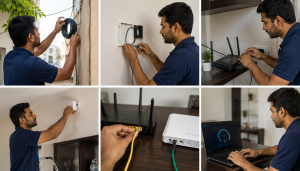
The Installation Process, Step by Step
Knowing the sequence removes most of the anxiety. Here’s what actually happens when you book a new broadband connection Pune technicians install:
- Feasibility confirmation. You share your address; the provider checks network coverage against their fibre map and confirms serviceability.
- Plan selection. You pick a speed and billing cycle. Ask what happens at renewal promotional first-cycle pricing that jumps later is common.
- Booking and KYC. You submit your details and keep original documents ready.
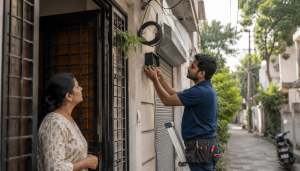
- Fibre drop. The technician runs optical fiber from the building’s distribution point into your flat and terminates it at an ONT.
- Router installation. The WiFi router is connected, configured, and placed. Ask for it to go in a central, open, elevated spot not inside a shoe cabinet, which is where a surprising number of routers end up.
- Broadband activation and testing. Your account goes live and the technician runs a speed test on both bands.
- Handover. You get your WiFi name and password, account number, and a support contact.
Before the technician leaves, run your own test on a phone in the furthest room you’ll actually use. Speeds at the router tell you the connection works.
Speeds in your bedroom tell you whether the placement works. Fix it while somebody with a ladder is still standing there.
Router placement is only part of it; here’s how to improve your WiFi speed at home once you’re set up.

Choosing the Right Speed: 100, 200 or 300 Mbps?
Most Pune households overbuy speed and underbuy stability. A stable 100 Mbps connection beats an unstable 300 Mbps one for every single real-world use case.
Work out your number from concurrent usage, not device count:
- Work from home: video calls need surprisingly little download speed but are sensitive to upload speed and jitter. Two adults on simultaneous calls are comfortable on 100 Mbps if the upload is symmetric-ish and latency is stable. Ask what upload speed you’re getting most providers don’t advertise it.
- Online classes: similar to work from home, but reliability matters more than raw speed. A dropped class is worse than a slow one.
- OTT streaming: roughly 25 Mbps per simultaneous 4K stream. Three 4K streams plus normal browsing is comfortable on 200 Mbps see our full guide to the speed you need for 4K streaming.
- Gaming: ping matters, bandwidth barely does. A 100 Mbps fibre line with 15ms latency outperforms a 300 Mbps line with 60ms latency every time. Ask about routing to Mumbai game servers specifically.
- Uploading: creators, architects and anyone pushing large files to cloud storage should size on upload, not download.
A practical rule for PCMC: a family of four with two work-from-home adults, one student and regular OTT viewing is well served by 200 Mbps unlimited.
Going to 300 or 400 Mbps only helps if your current bottleneck is genuinely bandwidth rather than WiFi coverage or evening congestion and in most flats I’ve seen, it isn’t.
If you want to size this more precisely, our breakdown of how much WiFi speed your home actually needs walks through it by household type.

Six Things to Confirm Before You Pay
We’ve written separately about the common mistakes people make choosing WiFi in Pune these six questions prevent most of them. Any provider worth using will answer all six without hesitating.
- What is the actual monthly price after the first cycle? Introductory pricing that resets at renewal is the most common complaint in Indian broadband.
- Is the data genuinely unlimited, or is there a FUP? “Unlimited” sometimes means unlimited at reduced speed after a threshold. Get it in writing.
- What’s your service response time, and is it a commitment or an aspiration? A provider who commits to a fixed response window is exposing themselves to accountability. That’s a good sign.
- Is the router free or a refundable deposit? And who replaces it if it fails in month seven?
- What are the evening peak speeds in my specific building? Contention ratios vary by node. Ask for real numbers from existing customers nearby.
- What happens if I shift house within Pune? Relocation should be cheap or free within the provider’s own network footprint.
If a provider hesitates on question three or five, that tells you more than any plan comparison table will.
Conclusion
Getting connected doesn’t have to be complicated. Confirm fibre actually reaches your building, keep one government ID ready that proves both who you are and where you live, budget ₹500 to ₹1,500 a month depending on the speed you genuinely need, and expect installation to take hours rather than weeks if the cabling is already there.
If you’re arranging a new broadband connection Pune-side particularly across PCMC Internet Express is worth a conversation.
We run a 100% FTTH fiber network across Bhosari, Dighi, Moshi, Chinchwad, Dhanori, Vishrantwadi, Charholi, Dhanore, Markal and Fulgaon, with free installation, a free dual band WiFi router, and unlimited data on every plan.
What sets us apart isn’t the speed number on the plan. It’s what happens afterwards.
Our technicians live and work in the areas they serve, which is why installation typically completes within hours rather than days, and why service issues get a response inside an hour instead of a queue ticket.
That local presence is also why we cover buildings and colonies the national providers haven’t reached yet.
Affordable plans, genuinely high-speed fiber internet, reliable local customer support, and coverage built specifically for Pune and PCMC that’s the whole proposition.
Send us your address on WhatsApp and we’ll confirm whether fibre reaches your building today. No callback queue, no sales script, just a straight yes or no.
📞 +91 9960068002 | 💬 WhatsApp us | 🌐 Check coverage in your area